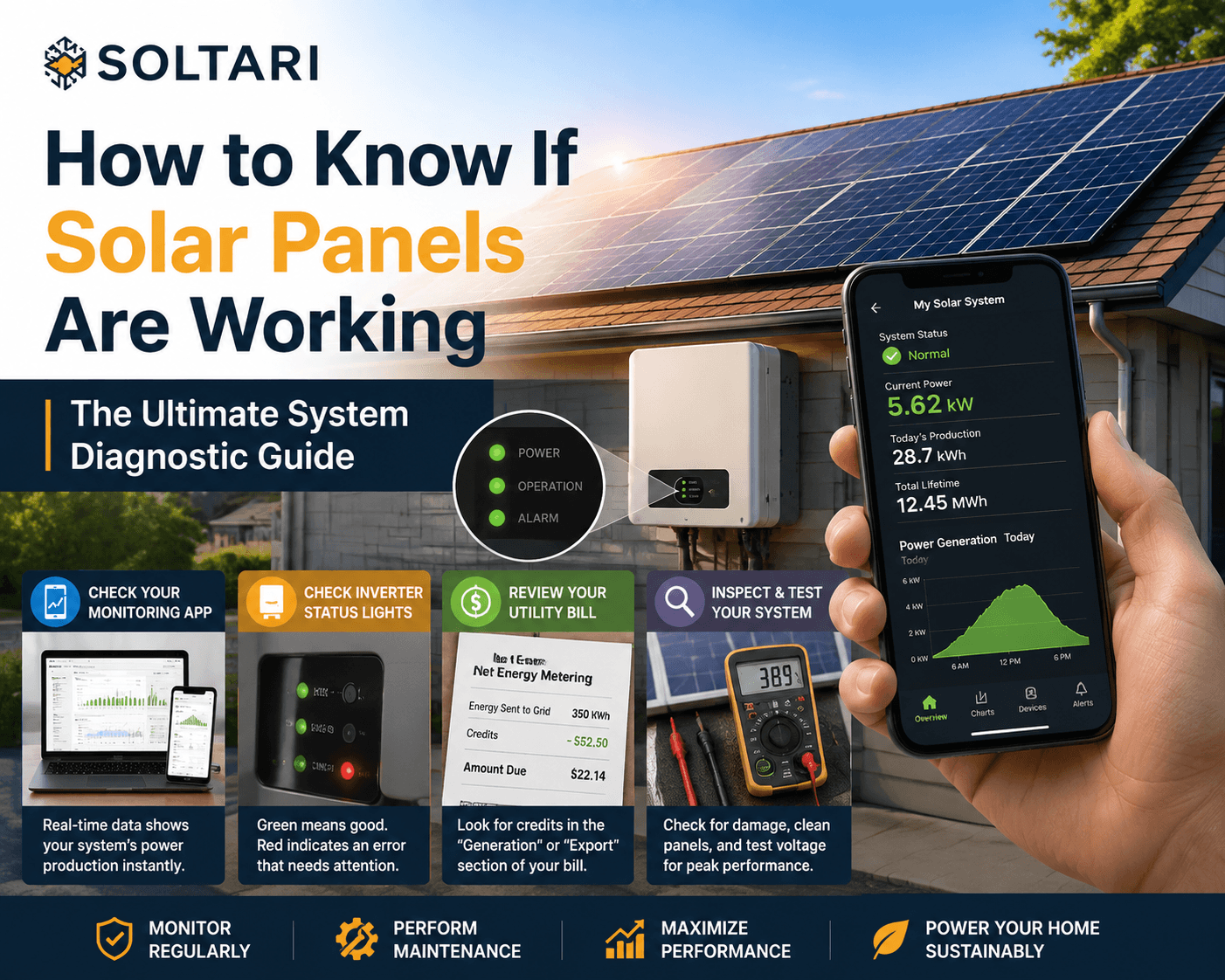
Installing a rooftop solar energy system is a major investment, but once the installation team leaves, how do you verify that your system is actively producing clean power? Knowing how to know if solar panels are working properly is essential for ensuring you receive the full financial payback on your system. Because solar arrays have no moving parts or loud engines, they operate silently, making it tricky for a casual observer to spot an issue. If you want to learn how to know if solar panels are working, you must know how to read your inverter display, analyze your online monitoring portal, and interpret your monthly utility bills. This comprehensive guide covers all physical, digital, and electrical methods to help you monitor your system’s performance and troubleshoot zero-output errors.
Primary Indicators to Know If Solar Panels Are Working Correctly
The easiest way to check your system’s health is by reviewing digital performance data provided by your equipment.
Checking Your Mobile Solar Monitoring App and System Dashboard
The quickest answer for how to know if solar panels are working is looking at your solar app on your smartphone or desktop computer.
-
Real-Time Generation Data: Modern solar systems (such as Enphase, SolarEdge, or Tesla) come with cloud-based monitoring software that displays your system’s instantaneous generation in kilowatts (kW) and total daily generation in kilowatt-hours (kWh).
-
Individual Panel Performance: If your system utilizes microinverters or power optimizers, the app will show a graphical map of your roof. You can see the exact output of every individual panel. If one panel appears dark or shows zero production while others are bright green, that individual module or microinverter requires attention.
Reading Your Inverter LED Indicator Lights and Error Codes
If you don’t have access to a mobile app, you can learn how to know if solar panels are working by looking directly at the central string inverter mounted on your garage or exterior wall.
-
Green Light: Indicates that the inverter is powered on, synchronized with the utility grid, and actively converting DC power into AC power.
-
Flashing Green or Yellow Light: Indicates the system is starting up, shutting down at dusk, or operating at reduced capacity due to high temperatures or low sunlight.
-
Red Light or Solid Error Code: Indicates a critical fault. The inverter has shut down due to a ground fault, voltage surge, or internal hardware failure.
Analyzing Your Monthly Electric Bill for Net Metering Credits
Your monthly utility statement (such as from PG&E) provides a clear financial answer when evaluating how to know if solar panels are working.
-
Net Energy Metering (NEM) Statements: Check the “Generation” or “Export” section of your electric bill. You should see credits for electricity sent back to the grid during sunny hours.
-
Unexpected Bill Spikes: If your electric bill suddenly jumps back up to pre-solar levels during a sunny month, it is a major red flag that your solar system is completely offline or operating at heavily degraded efficiency.
Physical and Technical Methods to Test Solar Panel Performance
If digital monitoring shows a drop in power output, physical and electrical testing can pinpoint the exact cause.
Inspecting Rooftop Panels for Physical Damage and Dirt Soiling
A visual inspection can answer how to know if solar panels are working at their designed efficiency without touching electrical components.
-
Dirt and Soiling: Accumulated dust, bird droppings, or fallen leaves physically block photons from reaching the silicon solar cells, dropping efficiency by 15% to 25%.
-
Physical Damage: Inspect the glass surface for cracks, burn marks, or moisture ingress underneath the glass layer. Physical damage often occurs after severe hailstorms or fallen tree branches. Inspecting these residential rooftop solar configurations safely from the ground using binoculars is always recommended over climbing a steep roof.
Using a Multimeter to Measure Voltage Output at the Junction Box
For those with electrical experience who want to learn how to know if solar panels are working at the module level, a digital multimeter can measure voltage.
-
Open Circuit Voltage (Voc) Test: Disconnect the panel from the string and measure the voltage across the positive and negative terminals using a multimeter set to DC voltage.
-
Comparing Readings: Compare the multimeter reading to the “Voc” rating listed on the specification sticker on the back of the panel. If the measured voltage is significantly lower than the factory spec, the panel has an internal cell failure.
Monitoring Inverter Heat and Internal Cooling Fan Operation
Inverters generate heat while converting high-voltage electricity.
-
Thermal Management: Working inverters feel warm to the touch (similar to a computer power supply). If an inverter becomes too hot, its internal thermal sensors will automatically throttle back power production to protect internal circuits.
-
Cooling Fans: Check that the inverter’s heat sink fins are clean and that cooling fans are running freely. Excessive heat buildup is a major cause of mid-day system shutdowns in commercial solar power engineering and residential setups alike.
Troubleshooting Common Causes of Zero Solar Power Output
If you follow these steps and discover your system is not producing electricity, several common issues may be responsible.
Tripped AC and DC Circuit Breakers or Disconnect Switches
Before assuming your solar equipment is broken, check the simple mechanical safety switches:
-
Main Solar AC Breaker: Located inside your main electrical panel. If a power surge occurred on the grid, this breaker may have tripped to the “OFF” position.
-
Rooftop or Wall DC Disconnect: Check the lever on the safety shutoff box mounted near your inverter to ensure it has not been bumped into the “OFF” position.
-
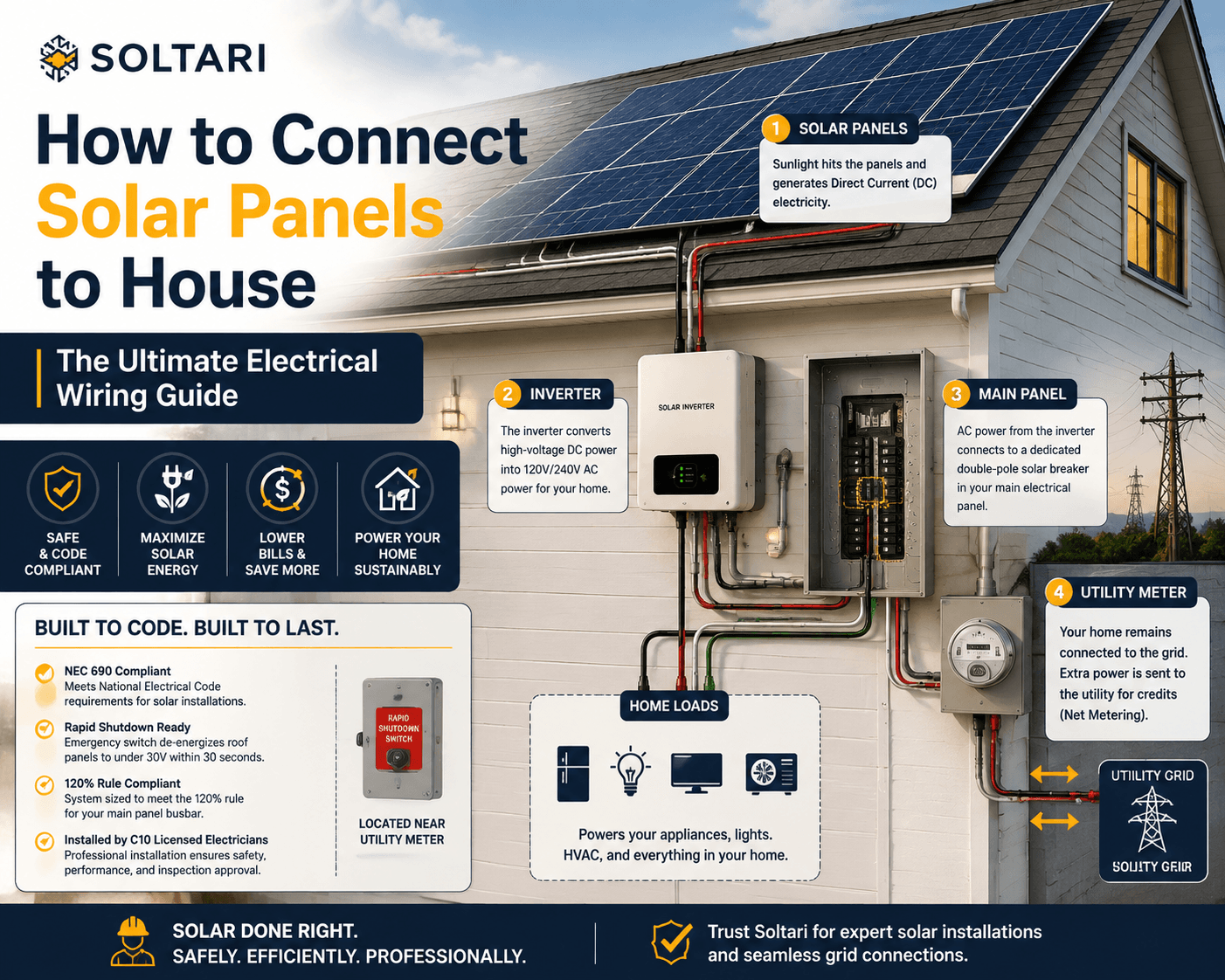
Rapid Shutdown Switch: Ensure your emergency rapid shutdown switch has not been engaged. Resetting these breakers often resolves the issue instantly, allowing your system to resume charging your smart home battery power reserves.
Inverter Failure and Grid Frequency Synchronization Issues
Inverters require a stable signal from the utility grid to operate.
-
Anti-Islanding Shutdown: If the utility grid experiences a blackout, your grid-tied inverter will automatically shut down for safety reasons. It will not turn back on until utility power is fully restored and stable for at least 5 minutes.
-
Grid Voltage Spikes: If the utility grid’s voltage rises too high during hot afternoon hours, your inverter may automatically trip off to protect itself from damage.
Severe Shading and Microinverter Communication Faults
If you are using microinverters and your app displays an “Envoy/Gateway Communications Error,” the microinverters may still be generating power on the roof, but the cellular or Wi-Fi gateway box inside your home has lost internet connection. Resetting your home Wi-Fi router or gateway box often restores online monitoring without requiring a service technician.
Inverter Fault Codes and Recommended Diagnostic Actions
When analyzing how to know if solar panels are working, use this reference table to understand common inverter status indicators:
| Inverter LED Light | App Status Message | Probable System Condition | Recommended Diagnostic Action |
| Solid Green | Normal / Producing | System is generating power normally | No action required |
| Flashing Green | Sleeping / Night Mode | Low sunlight or system starting up | Normal at dawn, dusk, or heavy shade |
| Solid Yellow | Grid Voltage Warning | Utility grid voltage is too high/low | Monitor; system will auto-restart when grid stabilizes |
| Solid Red | Isolation Fault / HW Error | Critical DC ground fault or board failure | Turn off solar breaker and call a certified technician |
| No Lights On | No Communication | No DC power from roof or broken fuse | Check DC disconnect lever and AC main breaker |
Resolving Solar Panel Performance Issues
If digital app checks, breaker resets, and visual inspections do not resolve your energy drop, it is time to seek professional diagnostic support.
When to Hire Certified Technicians for System Maintenance
High-voltage solar systems carry significant electrical risks. Attempting DIY electrical repairs on DC string wiring or opening high-voltage inverter enclosures can cause severe electrical shock. Working with a premier California renewable energy team guarantees that your system is diagnosed safely using specialized thermal imaging cameras and voltage meters.
The Soltari Engineering Standard Precision Diagnostic Audits
At Soltari, LLC, we prioritize technical excellence, craftsmanship, and long-term customer care. Our team of C10 licensed electricians and NABCEP-certified technicians specializes in full-system performance checks, inverter repairs, string rewiring, and solar panel washing across Santa Cruz and Monterey County. We diagnose the root cause of your system’s power drop to ensure your panels return to peak production quickly.
Request an Engineering Site Consultation for a Diagnostics Audit
Don’t let hidden system errors waste your solar investment or leave you with high utility bills. Request an engineering site consultation today to receive an itemized, professional system performance audit and repair estimate for your property.
Frequently Asked Questions About Checking Solar Performance
How do I know if my solar panels are working if I don’t have a mobile monitoring app?
If you do not have a smartphone app, check your physical solar inverter mounted on your wall. A solid green light indicates the system is generating electricity. You can also check your electric bill for export credits or look at your bi-directional utility meter to see if the arrow is pointing away from your house during sunny peak hours.
Why does my solar app show zero solar production on a bright sunny day?
Zero production on a sunny day usually indicates that a circuit breaker has tripped (either the main solar AC breaker in your electrical box or the external DC disconnect switch) or that your inverter has experienced a critical internal fault. Check your circuit breakers first before calling an electrician.
Do solar panels make a noise when they are working?
Solar panels on the roof are completely silent. However, your central solar inverter mounted on the wall may produce a low, gentle hum or a quiet fan whirring noise during peak afternoon production hours as it converts power and cools its internal electronics. This humming is completely normal.
How can I tell if an individual solar panel is dead on my roof?
If your system uses microinverters or power optimizers, your mobile monitoring app will show a panel-by-panel layout map, highlighting any single dead module in black or red. If your system uses a central string inverter without optimizers, identifying a single dead panel requires a technician to test each panel’s voltage individually with a multimeter.
How much does a professional solar diagnostic check cost?
A professional solar system diagnostic audit typically costs between $150 and $250, depending on your location and roof accessibility. The technician will test string voltages, inspect wire connections, check inverter thermal performance, and verify ground fault protection.
Why is my solar system producing less power this month compared to last year?
Lower production can be caused by heavy dust accumulation on the glass (soiling), seasonal changes in the sun’s angle, growth of nearby trees casting new shade, an inverter derating due to extreme summer heat, or a failing microinverter. Cleaning the panels and getting a professional diagnostic check will resolve most production drops.